MCP Service
The MCP (Model Context Protocol) service lets external AI tools view the KVM screen, control keyboard/mouse, manage power, send Wake-on-LAN, and mount virtual media. It replaces the older built-in CUA feature.
Enable
- Open Settings → Extensions → MCP Service.
- Turn on Enable MCP.
- Set the request rate (1–100 requests per second).
- Copy the endpoint and API Key.
- Click Save.
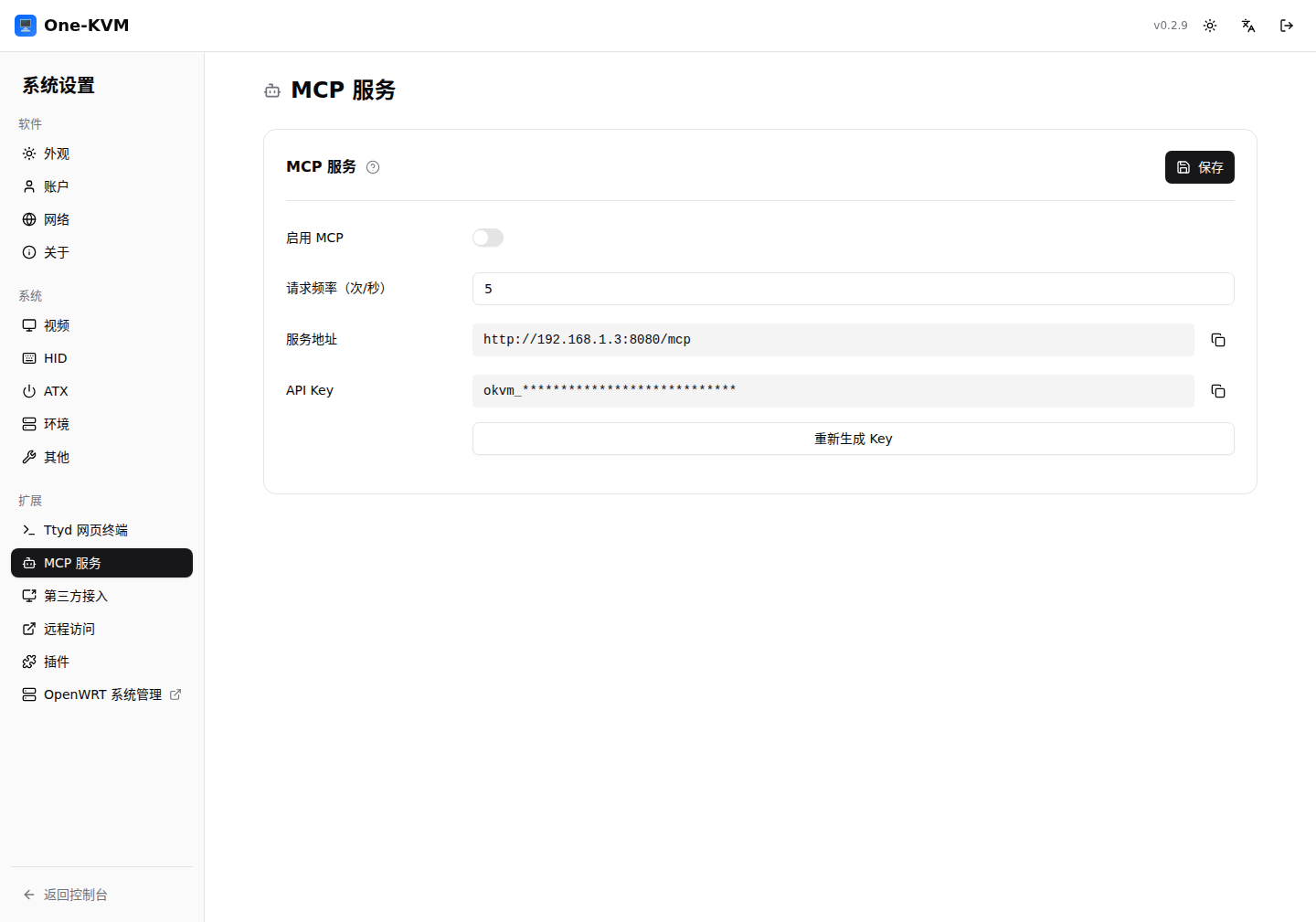
One-KVM generates an API Key when MCP is enabled. Regenerate Key invalidates the previous key immediately.
Client Configuration
The endpoint is normally:
Clients authenticate with a Bearer token:
Some MCP clients use a configuration like:
Check your client's documentation for the exact schema. MCP accepts same-origin requests only; when using a reverse proxy, keep Host and Origin consistent.
Tools
| Tool | Purpose |
|---|---|
one_kvm_get_status |
Video signal, resolution, HID capabilities, and queue length |
one_kvm_screenshot |
Capture a JPEG at the native source resolution; quality 1–100 |
one_kvm_execute_actions |
Run a batch of HID actions; pointer coordinates are normalized to 0–1 over the full screen; optionally return a fresh screenshot |
one_kvm_power |
ATX short press, long press (force off), or reset |
one_kvm_wake_on_lan |
Send a WOL magic packet to a MAC address |
one_kvm_list_media |
List uploaded ISO/IMG images, IDs, sizes, and mount state |
one_kvm_mount_media |
Mount an image ID into a free media slot; CD-ROM and read-only by default |
one_kvm_unmount_media |
Unmount the image with the specified ID |
Notes
- Screenshots always use native capture resolution without resizing or cropping.
- Pointer coordinates use
(0,0)at the top-left and(1,1)at the bottom-right. Text input uses the target's US keyboard layout and supports ASCII, newline, and Tab; clipboard and arbitrary Unicode are not supported. - All actions share a global FIFO and rate limit. Coordinate multiple clients externally.
- If the connection fails during an action, the action may already have executed. Inspect the screen before retrying.
- A successful power command means the button pulse was sent, not that the target completed startup or shutdown.
- MCP has the same hardware control capability as the web console. Keep the API Key private and do not expose MCP directly to the internet.