EasyTier Mesh
The EasyTier extension uses easytier-core to create a peer-to-peer virtual LAN for One-KVM and other devices. The program must be installed and shown as available before it can start.
Configuration modes
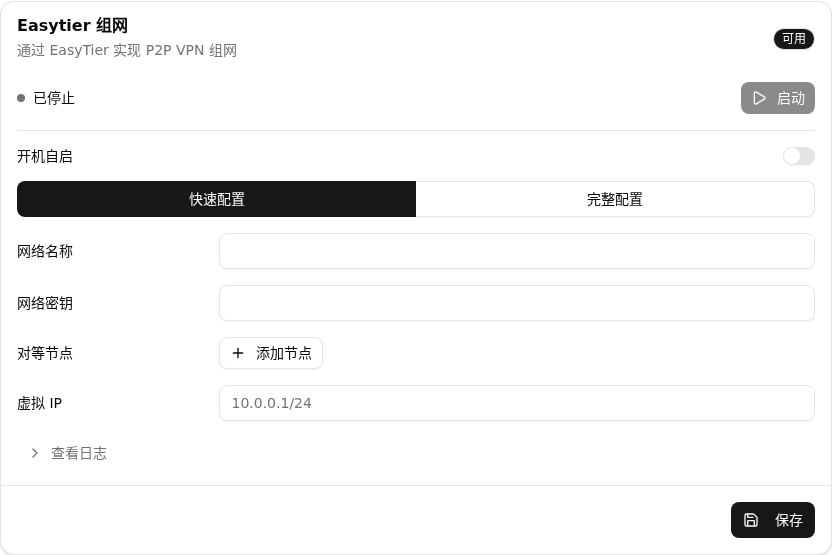
EasyTier provides Quick configuration and Full configuration modes.
Quick configuration
| Item | Description | Example |
|---|---|---|
| Network name | Required name shared by the virtual network | one-kvm |
| Network secret | Optional; peers should use the same secret | your-secret |
| Peer nodes | Optional bootstrap nodes; multiple values are supported | tcp://1.2.3.4:11010 |
| Virtual IP | Optional address and subnet; leave empty for automatic allocation | 10.0.0.2/24 |
Only the network name is required in quick mode. When no virtual IP is supplied, EasyTier assigns one automatically.
Full configuration
Switch to Full configuration and paste a complete easytier.toml. TOML is validated when saved. Quick-mode fields do not generate startup arguments in this mode.
Steps
- Confirm that
easytier-coreis installed and available. - Open Settings -> Extensions -> Remote access -> EasyTier.
- Choose a mode and fill in its fields.
- Click Save, then Start. Fields are locked while running.
- Use Stop and View log to stop the service or inspect its output.


Public node configuration
Public node settings are collapsed by default and are shown only in the local browser. Public nodes have no availability or quality guarantee; do not abuse them, flood traffic, attack, bulk-use resources, or use them unlawfully.