OneCloud Pro
Hardware Overview
OneCloud Pro uses an S912 octa-core CPU with 2 GB RAM and 8 GB internal storage. It has a gigabit Ethernet port, two USB 2.0 ports, a TF card slot, and HDMI output.
Integrated Image Deployment
- Prepare the SD card: Write the One-KVM image to an SD card and insert it into the OneCloud Pro SD slot.
- Boot from SD: For the first flash, hold the reset button while powering on, then release after the OneCloud logo disappears. For later flashes, power on directly to boot from SD.
- Install to eMMC: After booting from SD, log in via the One-KVM web terminal or SSH and run
armbian-install. Select the correct model (v1.1 board uses code 201; v1.2 board uses code 213) to install One-KVM.
Installation example (via One-KVM web terminal):


Usage Notes
Hardware safety warning
To avoid potential risks (e.g., the target device failing to boot or recognize devices, and in rare cases hardware damage), we strongly recommend one of the following safety measures before using a USB male-to-male cable:
Option 1: Cut or remove the red 5V power wire (VCC) in the USB cable, leaving only data (D+/D-) and ground (GND) to prevent back-powering.
Option 2: Insert a USB hub with an independent power switch in the link, and keep the hub powered off when connecting.
Some low-power devices may draw power back through the USB OTG port when their main power is off, causing an abnormal state that may prevent boot even after main power is restored.
Unless you fully understand the risks, use one of the above protections to keep devices safe.
Data safety
Avoid hard power-offs. Sudden power loss during eMMC writes can cause data loss.
If you must cut power, run sync after write operations to flush data. For shutdown or reboot, use poweroff or reboot so the system can sync and shut down cleanly.
SSH remote login
SSH is enabled by default on Armbian. The initial credentials are root/1234.
System upgrade warning
Do not use apt upgrade to upgrade the kernel and device tree; this may break the system and OTG functionality.
Hardware connections
The USB port next to the QR code is the OTG port for the male-to-male cable. The USB port next to the Ethernet jack is a normal USB port for the USB HDMI capture card.
ATX power control
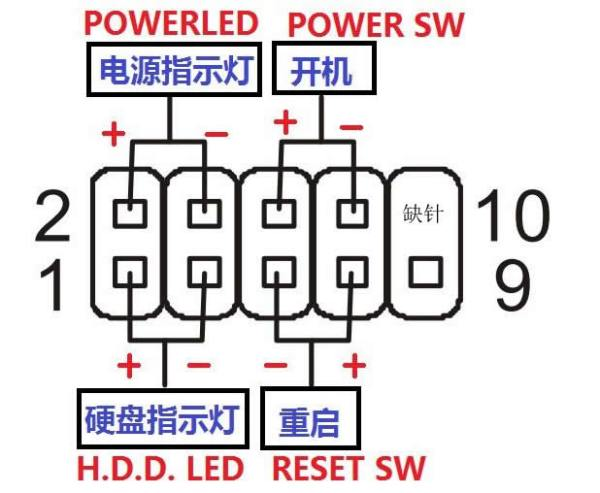
The board has GPIO pins that can be used for ATX power control.

If you want to use ATX to control physical power on/off, connect the power switch cable.